AIStep 1 of 5
Triage the request
Requested → Ready to assign
AI reads the fault report, identifies the equipment and suggests a priority.
A clear job brief, ready for dispatch.
Inistate gives your people, AI, and automations one shared operational workflow, so everyone knows what’s happening, what can happen next, and who needs to act.
Free forever for small teams. No credit card required.
Your interface, generated by Inistate. No coding or deployment.
Running operations at Omni-Plus, Lavender, PC Dreams and RentWorks.
Example · JOB 00042
One record. One state. Only the activities that state permits. Every actor on the same history.
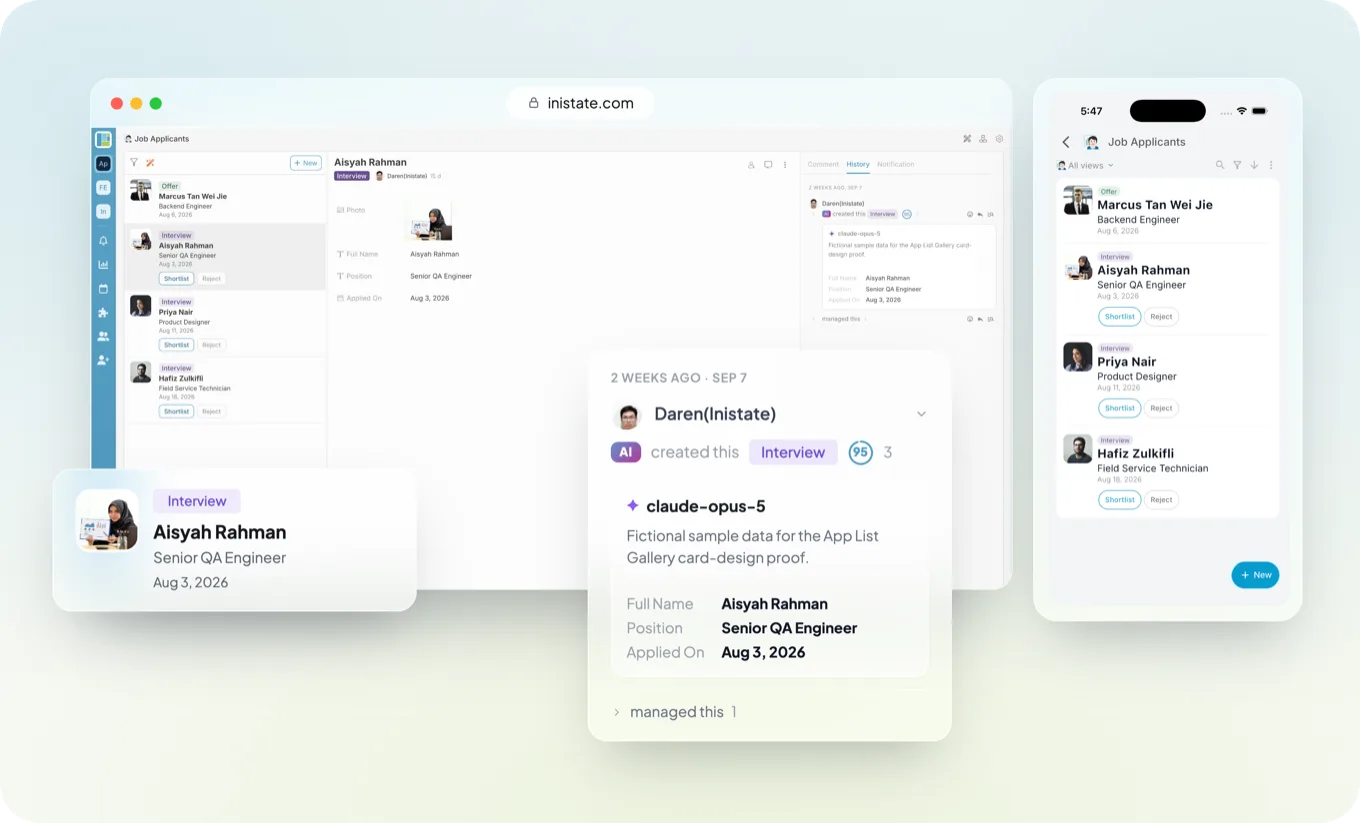
Inistate automatically designs a view to fit your workflow.
Thoughtfully arranged. Ready to use. Yours to customize.
Photos take the lead. Prices and property details stay right where you need them.
See the person, the role and the next action. Move the right candidates forward.
A menu made for browsing. Beautiful image cards, with every price in place.
Amounts, details and approval states. Everything you need for a quick review.
A gallery that lets your products shine, with images and prices together.
Actual Inistate views. Example data.
Start with the view Inistate creates. Customize the layout, choose what to show, and make it work your way.
The lead gets enriched. The ticket gets routed. The approval happens in a chat thread. Every automation runs fine, and a manager still becomes the human router between them.
Today you ask
“What’s happening with this?”
“Who has it?”
“Are we waiting on someone?”
“Did the AI already do it?”
With one workflow
Here is the state it’s in.
Here is who owns it.
Here is what it’s waiting for.
Here is what acted, and when.
Inistate is workflow management software, built as an operational workflow platform. Every job, case, request or claim on it runs on the same four-part contract, whoever moves it — which is what makes the status trustworthy.
State Activity (Form) State
and every one of them is written to history
In a real workflow
This claim is Submitted. Finance, the claimant and any automation reading it get the same answer.
From Submitted, only Approve or Reject can happen. Mark Paid waits until the claim is Approved.
Reject asks for a Rejection Reason, so the reason stays on the claim, not in a chat.
Submit moved it from Draft to Submitted, and the claim keeps who did it, when and with what.
Without it the status lives in a spreadsheet column, a chat thread and somebody’s memory — and they disagree.
Without it anyone can set any status at any time, so a record can say Completed while the work is half done.
Without it work moves on with the photo, the reason or the amount missing, and somebody chases it afterwards.
Without it you have logs that say a workflow ran, not who approved what, or why.
Open an example and follow the work from request to completion. Different strengths, one shared history.
 Field OperationsFrom a reported fault to a finished job.
Example workflow Choose a step to see the handoff
Requested → Ready to assign
AI reads the fault report, identifies the equipment and suggests a priority.
Ready to assign → Assigned
Assignment rules route the job to the available field team and send the customer an appointment notification.
Assigned → Work completed
The technician fixes the leak and submits site photos, time spent and a completion note.
Work completed → Evidence missing
AI checks the submission and finds the completion photo missing, so it sends the job back with exactly what is needed. Sign-off is not offered until it is there.
Evidence missing → Closed
The technician adds the photo from the site. The supervisor reviews the evidence and signs off, and automation sends the completion notice to the customer.
 Software Development IssuesFrom a reported problem to a verified release.
Example workflow Choose a step to see the handoff
New → Reported
A support specialist records what happened, who is affected and the steps needed to reproduce the problem.
Reported → Ready for development
AI summarizes the report, identifies the affected area, checks for related issues and suggests a severity for the product owner to review.
Ready for development → In review
A developer reproduces the failure, implements a fix and links the code change and test evidence to the issue.
In review → Ready to release
A teammate reviews the change while QA verifies the original scenario and records the test outcome.
Ready to release → Resolved
Entering Ready to release triggers the deployment pipeline. When it reports success, automation updates the issue and notifies the reporter.
 Service & SupportGive every request a clear path to resolution.
Example workflow Choose a step to see the handoff
New → Triaged
AI summarizes the customer’s message, categorizes the issue and suggests troubleshooting steps.
Triaged → Assigned
Routing rules assign the ticket to account support and start the response-time reminder.
Assigned → Resolved
A support specialist verifies the account, restores access and records the solution.
Resolved → Awaiting confirmation
Automation sends the resolution to the customer and schedules a follow-up reminder.
Awaiting confirmation → Closed
The customer confirms access is restored. The specialist closes the ticket with the resolution attached.
 Work Order ManagementMove a request through approval and delivery.
Example workflow Choose a step to see the handoff
Requested → Pending approval
AI turns the maintenance note into a work order with the scope, supporting details and a cost estimate for review.
Pending approval → Approved
The manager reviews the scope and estimate, confirms the budget and records the decision.
Approved → Scheduled
Automation assigns the approved order to the maintenance team and sends the schedule to everyone involved.
Scheduled → Completed
The team replaces the pump and records the parts used, completion notes and inspection photos.
Completed → Closed
The manager checks the completed work and signs off. Automation updates the asset record and notifies the requester.
 Auditors & AccountantsFrom missing client documents to a reviewed file.
Example workflow Choose a step to see the handoff
New → Awaiting documents
The engagement lead lists the statements, invoices and supporting schedules needed from the client, with an owner and due date.
Awaiting documents → Documents received
Automation sends the request, reminds the client about outstanding items and updates the request when the requested uploads arrive.
Documents received → Ready for review
AI organizes the uploads, matches them to the checklist and flags possible gaps or inconsistencies for the reviewer.
Ready for review → Reviewed
The auditor or accountant checks the source documents, resolves questions with the client and records their review decision.
Reviewed → Closed
Entering Reviewed triggers a notification to the engagement owner. Once the notification result is reported back, the request closes with the reviewed file linked.
 Property AgenciesFrom a property enquiry to a completed viewing.
Example workflow Choose a step to see the handoff
New → Ready to assign
AI reads the enquiry and extracts the preferred location, budget and viewing availability, flagging missing details for follow-up.
Ready to assign → Assigned
Routing rules assign the enquiry to the agent responsible for the listing and notify them of the new request.
Assigned → Viewing scheduled
The agent confirms that the property is available, agrees a time with the prospect and records the appointment details.
Viewing scheduled → Reminder sent
The scheduled state triggers an appointment reminder with the address and contact details. The reminder result is reported back to the enquiry.
Reminder sent → Viewing completed
After the viewing, the agent records feedback and agrees the next action: send more details, arrange another viewing or prepare an offer for review.
People make decisions. AI interprets information. Automation connects systems. All three move the same work forward, under the same rules.
Choose a card to see how each connects to Inistate.
People work in the app — web and mobile
They see the record, the state it is in, and only the activities that state permits — so the form is filled in before Complete Job is available.
AI works in its own client — over MCP

 or any MCP client
The aircon repair at Unit 12B is done — here is the photo.
Inistate · tool call
submit_activity
Done — JOB 00042 is Completed. I could not have skipped the completion photo: the activity requires it.
How many repairs are still open past their SLA this week?
read · list_entries Six, and four are with the same contractor. I can put that in a report with the time in each state.
The agent gets no private route: it reads what the state permits and submits the same activity, through the same form. The same connection answers questions and writes the report — from the live records, not a stale export.
Automation works on its own canvas — one node is Inistate
Through the n8n, Make and Zapier apps, or straight at the REST API and webhooks.


 or the REST API and webhooks
1 Into the workflow — your automation performs the activity
2 Out of the workflow — the activity and the state it lands in are triggers of their own
One node performs the activity the state permits — send it without the completion photo and it fails, instead of writing a status nobody can trust. And because the activity and the new state are recorded, they are things your next automation can wait for.
Three channels. One record: JOB 00042 · Aircon repair · Unit 12B, In Progress → Completed, on one history.
People judge. AI reasons. Automation executes.
Works with what you already run
An action moves the work forward. The new state starts the next automation. Follow each handoff on the same record.
Choose an actor, include the required information and submit an activity. Then see the state change, the automation trigger and the history it leaves.
People
Your team, on web or mobile
Automation
Keep executing where you already do
 InistateOne workflow. Every actor. Same rules.
Explore a workflow
Example · JOB 00042
The repair is finished. Include a completion photo to close out the work.
2. Inistate checks the workflow
3. The new state triggers an automation
Waiting for state changeSend the completion summary and photo to the tenant.
Complete the activity above to see the automation run. A blocked activity does not trigger it.
Illustrative example. A trigger starts the automation; its outcome is recorded when the connected tool reports back.
4. One shared history
Who acted, what they submitted and how the state changed. Follow the handoffs on the same record, including automation results reported back.
And the tools you already connect through them






Thousands more reach the same workflow through Zapier, Make and n8n. See how the connection works →
Different operations, different processes, one place the work actually lives.




“Inistate’s flexibility and robustness are impressive where it covers our customized internal business process for Lavender’s fast-growing expansion.”Mr Tam · Chief Executive Officer, Lavender Confectionery & Bakery
Inistate is not for every automation. It is for work that outlives a single run. Answer these about one process you have in mind.
Each one is a complete workflow on its own. Start there, then add the next process into the same system when you’re ready.
Your associate logs hours against the engagement as the work happens. Inistate reviews them against budget and hands clean time to billing.
Start with timesheetsYour technician finishes a job and snaps a photo. Inistate logs the visit, captures the parts used, and triggers the invoice.
Start with job loggingA client pings you on Slack. Inistate logs the ticket, routes it to the right engineer, follows up, and closes it under SLA.
Start with ticketsSend the request once. Inistate collects the document, files it against the right job, and chases anything missing.
Start with document collectionDifferent line of work? Browse workflow templates
Whether you run the operation or build the automation behind it, you end up on the same workflow.
You run the operation
Describe one recurring process. Inistate turns it into a structured starting point — states, forms, owners and history — that your team shapes into the workflow it runs.
Start with one workflow →You build the automation
Keep the automations. The verified n8n node gives your workflows state, permitted activities, typed forms and a history somebody can read.
Build with n8n →What it is, what it is not, and how it fits with the tools you already run.
One workflow per process, not one for the whole company. A job, a claim, a ticket or an onboarding each gets its own: the states it moves through, the activities each state permits, the form each activity requires, and one history of who did what. Start with the process that generates the most “any update?” messages. Add the next one when it has earned its place.
No, and it should not. Those tools execute: they move data, call systems and run the steps that never need judgment. Inistate holds the workflow around them — the state the work is in, what may happen next, who may act, and what already happened. Your automation performs an activity through the Inistate app on n8n, Make or Zapier, or straight at the REST API and webhooks, and the state it lands in can trigger the next automation. Many automations. One governed workflow.
Through MCP. Inistate is in the Claude and ChatGPT connector directories, and any other MCP client connects the same way. Once connected, the agent has no private route into your data: it can only perform the activities the current state permits, with the form each one requires, within the permissions you give it — never wider than the person it acts for. An activity your rules reserve for a person, like approving spend, stays with a person. It reads the same way it writes — ask it how many jobs are past their SLA this week and it answers from the live records, not an export.
It stops and asks. Past a confidence threshold the agent pauses for a person instead of guessing, and the question and the answer stay on the record. Every action it does take carries its reasoning, its sources, its confidence and the model used, on the action itself rather than in a separate log. So when something needs a second look you can see exactly what happened and why — and because the workflow rules apply to the agent too, it could not have skipped a required step to get there.
No. Describe the process in a sentence, forward the message you usually get, or photograph the form you use today, and Inistate turns it into a structured starting point — states, fields, owners and history — rather than a blank canvas. You shape it from there, without code. Bring one process, not the org chart; the rest of the operation joins one workflow at a time.
Free forever, no card. It includes 3 users, one of them a Pro user who connects the integrations and AI clients and can be a person, an automation or an AI agent; 500 active records plus 500 read-only; 1 GB of files; 7 days of change history; and unlimited modules, guests, documents, reports and built-in automations for notifications, reminders and alerts. It also comes with 1,000 AI credits, one-time, which is about enough for the AI to build one complete workflow with you. When you need more connections, upgrade up to 2 more users to Pro at US$8 a month each; for more people, move up a plan. If you outgrow a limit we warn you and suggest the next plan — we never refuse to take in your work. Details on pricing; for teams of 50 or more, see enterprise.
In credits, shared by the whole workspace, and they never expire. Plans buy the capacity — users, records, storage, history — and AI is metered separately, so a quiet month costs nothing extra and you are never paying a monthly fee for AI you did not use. Ordinary work such as logging a job from a photo, chasing an approval or drafting a document costs far less per turn than asking the AI to design or analyse something. Top up with a pack whenever you want more.
Yes to both. Inistate runs on the web and on iOS and Android, so a technician completes the job and attaches the photo from the site, and the record updates for everyone at once. For people outside your team — a customer confirming the fix, a client uploading year-end documents — you share a form or a record with them as a guest. Guests are unlimited, even on the free plan.
Those tools give you a place to put work, and increasingly an agent to help with it. But your team is still the workflow engine: the rules live in columns, buttons and habits. In Inistate the workflow is the product: the state, the permitted activities, the required forms and the history are what people, AI and automations all act through. Jira is built around tickets, sprints and epics for software teams; Inistate is built around states, activities and forms for any operation. App builders like Glide or Jotform build you an app and hand it back; Inistate stays inside the workflow and runs it with you.
Do — through Inistate. On its own, a chat gives you an answer in a window and forgets it when the conversation ends. Connected to a workflow, the same assistant performs activities on real records, within the rules, with every action on the history, and it is still tracking the work when the day ends. Keep the assistant you already use. Give it something that persists.
Inistate is ISO/IEC 27001:2022 certified, and the architecture is protected by US and Singapore patents. Because who did what, with which input, from which state, is written on the record itself, the audit trail is a by-product of the work rather than something reconstructed from exports and screenshots under deadline. For regulated teams, those fields are evidence your compliance team can map to obligations such as EU AI Act Article 14, FINRA Rule 3110, the Colorado AI Act and HIPAA audit controls. See trust and compliance and the privacy policy.
Work that fits inside a single automation run. A form that emails a spreadsheet row, a nightly sync, one isolated approval — your automation tool already handles those, and a workflow around them is overhead. Inistate is for work that outlives the run: a job, case, request, order or claim that moves through several states, that people and systems both touch, and that somebody keeps asking about.
One workflow. Every actor. Same rules.
Bring one process. Put your team, your AI, and your automations on it. See where it stands without asking anyone.
Free plan, no card ISO/IEC 27001 certified Works with n8n, Make and Zapier iOS & Android